Syllabot
Overview and Introduction: The WHAT and WHO
Syllabot is a Generative-AI-powered chatbot, built on ASU’s CreateAI Builder platform. It turns an uploaded syllabus into an interactive tool that can answer common student questions about due dates, assignments, grading policies, course expectations, and other course details. Instructors may also upload supporting documents, such as course schedules, assignment guides, rubrics, or policy pages, to strengthen the bot’s knowledge base. Students can ask natural-language questions, such as “When is the midterm?”, “What’s the late-work policy?”, or “How is participation graded?”, and Syllabot answers using the materials provided by the instructor.
The key idea is simple: instead of answering the same syllabus questions through email, office hours, and discussion boards throughout the semester, instructors can direct students to a course-bounded assistant that is available anytime. Syllabot relies on uploaded course materials, which significantly reduces AI hallucinations. Providing well-organized documents with clear headings and logical structure further improves response quality.
Faculty do not need coding experience to create a Syllabot. The minimum requirements are an ASU-affiliated CreateAI account, a finalized or near-final syllabus – (PDF, DOCX, or text file), any supporting course documents and roughly 20 to 30 minutes for the setup.
Syllabot is useful for instructors teaching in many course formats, from first-year through graduate courses, large lectures to small seminars, as well as in-person, hybrid, or fully online courses. It is especially valuable for:
- Instructors who want to introduce students to responsible, course-bounded use of Generative AI.
- Large enrollment courses where repeated syllabus questions consume significant instructor or/and TA time.
- Online and asynchronous courses where students need 24/7 access to course information.
- Courses with complex grading schemes, multiple assignment types, or detailed policies that students frequently misread.

Implementation and Timing: The WHEN, WHERE, and HOW
Build your Syllabot before the semester starts, ideally once your syllabus and major course policies are finalized. Initial setup takes about 20 to 30 minutes; brief updates (e.g., revised due dates) take only a few minutes.
Introduce Syllabot to students during the first week alongside other course tools. Reintroduce it before high-stakes moments, such as the first assignment, mid-term week, and final exam, when syllabus questions usually spike.
Syllabot can be shared with students in two ways:
- Direct link: students use – a shareable URL generated in CreateAI Builder.
- Embedded in Canvas: instructors embed Syllabot inside a Canvas page or module so students access it without leaving the course site.
To create your Syllabot quickly, have the following materials ready:
- A finalized or near-final syllabus
- Supporting materials such as course schedules, assignment guides, rubrics, or specific course policies, and
- A clear name for your Syllabot that students will recognize
For detailed setup instructions, refer to the Quick Start Guide and video walkthrough, then follow the steps below:
- Sign in to CreateAI Builder at ai.asu.edu with your ASURITE credentials.
- Choose the Syllabot template from the available templates rather than starting from scratch.
- Upload your syllabus (and any supporting documents such as course schedule, rubrics, or policy pages) as the knowledge base.
- Customize the student-facing interface: edit how Syllabot appears to your students before sharing it.
- Test the bot by asking realistic students questions such as “When is the midterm?” or “What is the late-work policy?”. Gaps in answers usually point to gaps in your syllabus, so fix the document, re-upload, and retest.
- Publish the Syllabot and share it via the generated link or embed the chatbot in Canvas.
Pro tip: Treat student questions to Syllabot as free formative feedback on your syllabus. If several students ask the same question, the issue may be unclear or hard to find in the course documents, not the bot.
Navigating the Video Walkthrough
The video walkthrough is an interactive Arcade demo. It pauses at each step and will not advance automatically. To move to the next step, click the highlighted area on the screen.
The numbered list below corresponds to the step numbers in the demo. Use these step ranges to quickly locate a specific part of the walkthrough:
| Task | Steps (Clicks) |
| Log in to CreateAI Builder | 1-3 |
| Upload your syllabus to the knowledge base | 4-6 |
| Publish and share with students | 7-10 |
| View the Syllabot from a student perspective | 11-17 |
| Add Syllabot to a Canvas module | 18-25 |
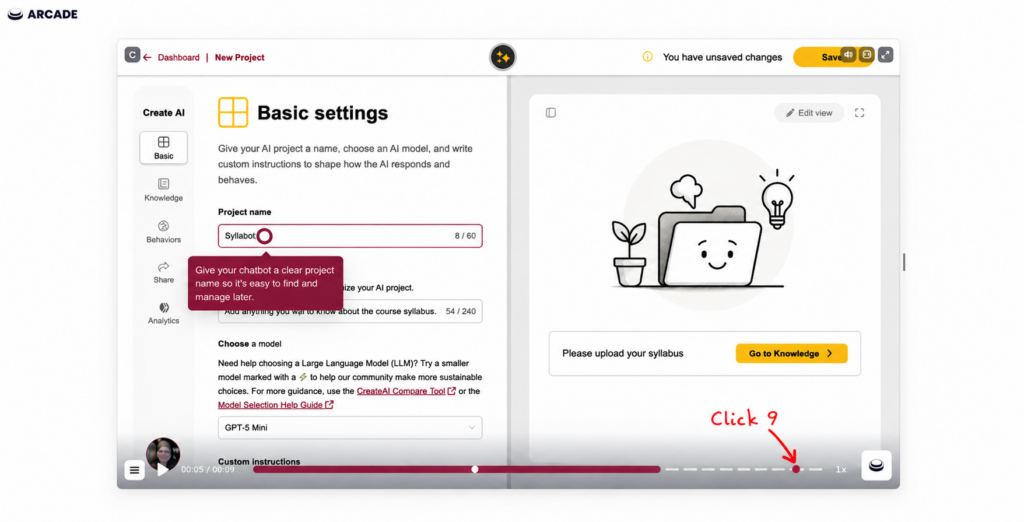
Example: The step numbers in this guide refer to the order of clicks in the Arcade walkthrough. In the example image below, the highlighted dot shows Step (click) 9 (the ninth click from the start of the demo).

Rationale and Research: The WHY
Pedagogically, Syllabot supports three things at once:
- Student success: Equitable, 24/7 access to course information benefits students with jobs, caregiving responsibilities, or those in different time zones who cannot reach the instructor during office hours.
- Instructor efficiency: Routine FAQs are offloaded allowing instructor and TA time to shift to higher-value teaching activities.
- Responsible AI use: Students experience a bounded, source-grounded AI tool, which provides a useful framing for conversations about academic integrity and appropriate AI use.
Because the Syllabot knowledge base is restricted to instructor-uploaded documents and runs on ASU infrastructure, Syllabot avoids two common concerns about classroom AI use: hallucinated answers and student data leaving the institution [1].

Additional Resources and References
Further reading
- MyAI Builder empowers the ASU community to create custom AI experiences (ASU Enterprise Technology)
- CreateAI offers the ASU community ways to make AI work for them (ASU Enterprise Technology)
- ASU faculty explore next-gen AI tools for education
- Learning Engineering Institute, Our Work
- Learning Design Suite
Acknowledgements
Syllabot was developed by ASU’s AI Acceleration team in collaboration with Danielle McNamara, Executive Director of the Learning Engineering Institute, and Jennifer Werner, AI Learning Strategist with Learning Experience Design.
This guide was developed with the contributions of Joshua Ansah, a PhD student (at the time of publishing) in the Engineering Education Systems and Design program in the Fulton Schools of Engineering.
References
[1] Learning Engineering Institute, “Our work: AI projects – Syllabot,” Arizona State University, Tempe, AZ. [Online]. Available: https://learningengineering.asu.edu/our-work/. [Accessed: Jun. 6, 2026].